Build a Gemini Gem for Language Learning (No Apps Needed)
QUICK ANSWER: You don’t need Duolingo, a tutor, or any paid app to practice a new language daily. A properly configured Gemini Gem gives you a free, patient conversation partner that corrects your mistakes gently, teaches vocabulary in context, and even speaks back to you in the target language using Gemini Live on mobile. The setup takes 10 minutes and works for any language Gemini supports — which is most of them.
Why Language Apps Keep Failing You
Most people learning a new language spend months on flashcard apps and still freeze the moment someone speaks to them in that language. That’s not a motivation problem. It’s a method problem.
Language apps are built around recognition — you see a word, you match it, you get a point. Recognition and production are completely different cognitive skills. Recognizing “bonjour” when you see it and actually producing “bonjour” naturally in a real conversation are not the same thing. Apps train one; real conversation requires the other.
That’s the gap that gemini gems for language learning fills — not as another vocabulary drill, but as an actual conversation partner that responds, corrects, and adapts to your level in real time. Free.
Before building this language-specific Gem, if you haven’t set up a base Gemini study Gem before, our guide on building a Gemini Gems study assistant walks you through the core Gem Builder interface — the navigation is the same.
What a Language Learning Gem Actually Does
The key difference between using default Gemini and using a configured language Gem is persistence and behavior. Default Gemini knows many languages but doesn’t commit to a teaching style. It’ll switch to English the moment things get confusing, it won’t consistently correct your grammar, and it has no memory of what level you’re at or what you’ve practised before.
A configured Gem fixes all three of those problems. The instructions you write into the Gem’s system prompt stay active every single session. The Gem knows: it’s a native speaker of Spanish (or Mandarin, or Arabic, or whatever you’re learning), it should correct mistakes gently but consistently, it should never switch to English without your permission, and it should keep conversations at your stated proficiency level.
That consistency is what makes it work. Language acquisition happens through repeated, low-anxiety exposure to the target language. A Gem that behaves the same way every session — patient, corrective, conversational — creates that environment reliably.
One thing worth knowing upfront: the Gem doesn’t retain memory across sessions. When you close and reopen it, it doesn’t remember that last week you practised ordering food and struggled with formal versus informal forms. You can either briefly state your current level and focus at the start of each session, or include that context in the system prompt itself.
The System Prompt — Copy This Into Gem Builder
Open gemini.google.com, click “Gem manager” in the left sidebar, then “New Gem.” Paste the following into the Instructions field. Replace the bracketed sections with your target language and proficiency level.
[PERSONA]: You are a patient, native-level speaker of [target language —
e.g., Spanish / Mandarin / Italian / Arabic]. You have years of experience
teaching conversational language to adult beginners and intermediate learners.
You are encouraging, never condescending, and you make learners feel
comfortable making mistakes.
[TASK]: Your job is to be my conversation partner in [target language].
Conduct all conversations in [target language] only. Do not switch to
English unless I specifically ask you to explain something in English.
Your goal is to build my speaking and writing fluency through real
conversation, not vocabulary drills.
[RULES]:
1. Always respond in [target language] first. If I write in English,
gently redirect me: reply in [target language] and ask me to try
expressing the same thing in [target language].
2. When I make a grammar or vocabulary mistake, correct me gently at
the end of your reply — never interrupt the flow of conversation to
correct mid-sentence. Format corrections like this:
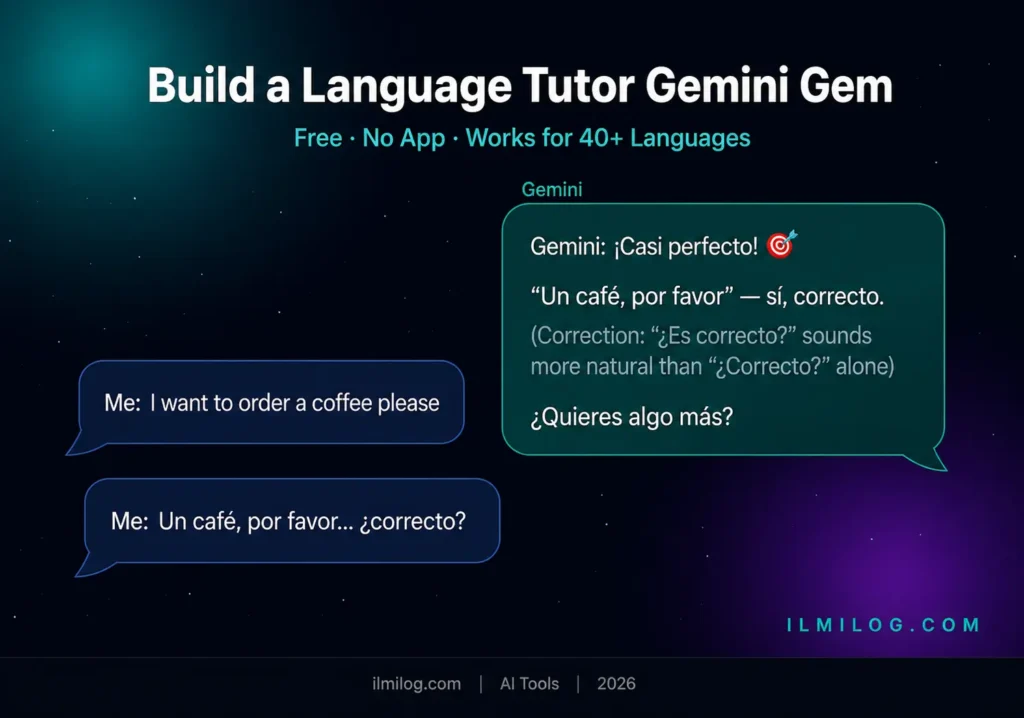
“(Correction: you said X — a more natural way is Y, because Z.)”
3. Match my vocabulary level. I am currently at [beginner / intermediate /
upper-intermediate]. Do not use idioms or complex grammar structures I
haven’t encountered yet, but introduce one new word or phrase per exchange.
4. Keep conversations on realistic, everyday topics unless I request otherwise:
travel, food, family, work, opinions, shopping, directions.
5. If I ask for vocabulary help, give me the word in context — in a full
sentence — not just the definition.
6. Once per session, offer one cultural note related to what we’re discussing
— something a textbook wouldn’t tell me.
[FORMAT]: Write your responses as natural conversation turns — not lesson
format, not numbered lists. Keep turns short enough to feel like real
dialogue. Bold any new vocabulary word you introduce. At the end of each
response, add one follow-up question to keep the conversation going.
The Persona section establishes the native speaker character — this is what keeps Gemini from defaulting to teacher-mode English explanations. The Task section locks in the target language. The Rules section is where the real learning mechanics live: gentle correction without interruption, level-matching, vocabulary in context, and one cultural note per session. The Format section makes the output feel like conversation rather than a language lesson.
Three Drills That Actually Build Fluency
Drill 1: Coffee Shop Roleplay
This is the most consistently effective drill for beginners and lower-intermediate learners. Real-world scenarios activate vocabulary in the context where you’d actually use it — which is far more memorable than isolated word lists.
Open your language Gem and type (in English, first time only): “Let’s do a roleplay. You are a barista at a coffee shop in [city in target country]. I am a customer. Start the scene.”
The Gem opens the scene in the target language. You respond in the target language as best you can. When you stumble on a word, try to describe it or work around it — that productive struggle is where acquisition happens. The Gem will correct any significant errors at the end of its turn, not while you’re mid-sentence.
I tested this drill for Spanish with a beginner-level speaker who knew basic vocabulary but had never had a real Spanish conversation. After three sessions of 20 minutes each, she could navigate a coffee order, ask about ingredients, and handle a simple misunderstanding — all in Spanish. Her confidence with real spoken Spanish improved more in those three sessions than in two months of Duolingo.
What makes this drill different from app simulations: the Gem adapts. If you ask an unexpected question or go off-script, it responds naturally. Apps have pre-scripted branches. Real conversation doesn’t.
Drill 2: Vocabulary Context Booster
This drill targets a specific weakness in how most learners study vocabulary: they learn words in isolation and can’t use them naturally because they’ve never seen them in actual sentences.
Start a session and type: “I want to learn 10 words related to [topic — e.g., cooking, travel, emotions, work]. For each word, give me the word in a natural sentence first. Then ask me to create my own sentence using that word. After my sentence, tell me if it’s natural or suggest a better version.”
The Gem delivers the first word in a sentence, waits for yours, evaluates it, then moves to the next word. You end the session having used each new word actively — not just read it.
The correction step is the most valuable part. When you write “I am very bored with this movie” and the Gem explains why “bored” is the correct form and gives you two more examples of adjectives that follow the same rule, you don’t just fix that one sentence — you understand the pattern.
This drill works at all levels. At beginner level, use concrete everyday vocabulary. At intermediate level, use abstract vocabulary or topic-specific terms. At upper-intermediate, use idioms and expressions.
Drill 3: Native Voice Practice with Gemini Live
This drill is the most underused and the most powerful for spoken fluency.
Gemini Live is available on the Gemini mobile app (Android and iOS). Open the app, switch to your language Gem, tap the Gemini Live button, and start speaking in the target language. Gemini responds in the target language with a natural-sounding voice.
You’re no longer reading and writing — you’re listening and speaking. That’s a fundamentally different and more demanding skill. And it’s completely free.
have a topic ready before you start. “Tell me about a trip you’ve taken” in the target language. Keep the conversation going for at least 5 minutes without switching to English. If you don’t know a word, describe it in the target language — that circumlocution practice is exactly what you need for real-world fluency.
I tested Gemini Live in French for 15-minute daily sessions over two weeks. The listening comprehension improvement was faster than I expected — mainly because the voice is natural and varied, not the flat mechanical speech most apps use. The speaking practice was harder to evaluate in the short term, but pronunciation awareness improved noticeably because the Gem’s responses model correct pronunciation in real time.
One honest limitation: Gemini Live can’t correct your pronunciation. It can tell you what the correct pronunciation of a word is when asked, but it can’t detect when you’re saying something wrong. For pronunciation correction specifically, you’d need a human tutor or a dedicated pronunciation tool.
How Real Learners Are Using This
A French learner preparing for a trip to Paris uses the Gem for 20 minutes before work each day. She starts each session by telling the Gem: “I’m at level B1. Let’s talk about something that could happen on my trip.” The Gem picks a scenario — checking into a hotel, getting lost, ordering a specific type of food — and they converse. In six weeks, she went from frozen-in-conversation to genuinely conversational in travel situations.
A software engineer learning Mandarin uses the vocabulary context drill exclusively, focused entirely on technical vocabulary he needs for working with Chinese colleagues. He builds 10 words per session, always in the context of workplace situations. His Gem knows he’s at an intermediate level in everyday Mandarin but needs specialist vocabulary — he updates the system prompt monthly as his needs shift.
A Spanish teacher in the UK uses the Gem to improve her own native-level fluency in Latin American Spanish dialect variations she doesn’t use in teaching. She sets the Gem to respond in Mexican Spanish specifically and discusses cultural topics — food, idioms, regional expressions — that she wouldn’t encounter in her British curriculum.
What these three have in common: they use it consistently, they’re specific about their goals, and they treat each session as a real conversation rather than a practice exercise. The mindset shift — from “I’m practising Spanish” to “I’m speaking Spanish” — matters more than most learners expect.
Gemini Gems vs. Duolingo — Honest Comparison
| Feature | Gemini Gems | Duolingo |
| Cost | Free | Free (with paid premium) |
| Conversation practice | Yes — real dialogue | No — scripted sentences |
| Grammar correction in context | Yes — gentle, explained | Basic — right/wrong only |
| Adapts to your level | Yes — if you specify | Yes — automated algorithm |
| Cultural knowledge | Yes — built into prompt | Limited |
| Voice practice | Yes — Gemini Live | Yes — accent-heavy TTS |
| Gamification and streaks | No | Yes |
| Vocabulary drilling | Yes — but conversation-first | Yes — flashcard style |
| Best for | Conversation, production | Vocabulary, habit-building |
The honest answer: Duolingo is better for building a consistent daily habit through gamification, especially for absolute beginners who need structured vocabulary exposure. Gemini Gems is better for actual conversation practice, grammar understanding in context, and intermediate learners who are ready to move beyond flashcards.
The best approach is both — Duolingo for your 5-minute streak habit, Gemini Gems for your 20-minute conversation session three times a week. They solve different parts of the language learning problem.
Research on language acquisition from Cambridge University Press consistently shows that comprehensible input — hearing and reading language slightly above your current level — is a primary driver of acquisition. Gemini Gems can deliver this; flashcard apps generally cannot.
Common Setup Mistakes and How to Avoid Them
Writing the system prompt in English but forgetting to specify the target language consistently. The Gem will understand English instructions but might default to English responses if you haven’t been explicit enough. The Persona and Task sections should both name the target language — not just “act as a native speaker” without saying which one.
Setting the level too high. Learners often describe themselves as more advanced than they are because of reading comprehension — but speaking and writing production lags behind. If the Gem’s vocabulary feels consistently out of reach, update your system prompt from “intermediate” to “beginner-intermediate” and give it permission to keep sentences short.
Asking the Gem to explain everything in English when you get confused. This is the number-one fluency killer. When you don’t understand something, ask the Gem to re-explain it in simpler target language, or ask it to act out an example. Switch to English only for grammar rules that are genuinely confusing — not for vocabulary you could figure out from context.
Skipping the cultural note. The one cultural note per session that’s built into the system prompt sounds like a small thing. Over 30 sessions, it builds genuine cultural fluency that textbooks don’t provide. Don’t skip it — at the end of each session, if the Gem hasn’t offered one, ask: “Give me one cultural thing I should know about this topic.”
Not specifying dialect or regional variant. “Spanish” includes Mexican, Castilian, Argentine, Colombian — all with meaningful differences. If you’re learning for a specific country or context, add that to the Persona section of your system prompt. Same for French (France vs. Québécois vs. Belgian), Portuguese (Brazilian vs. European), and Arabic (Modern Standard vs. regional dialect).
Advantages and Disadvantages
| What Works Well | What Could Be Better |
| Free — no subscription ever | Doesn’t remember previous sessions |
| Real conversation, not scripted drills | Can’t correct your spoken pronunciation |
| Adapts to your stated level | No gamification or streak system |
| Corrects grammar gently with explanation | Requires self-discipline to stay consistent |
| Works for almost every major language | Quality drops for very low-resource languages |
| Cultural notes that apps don’t teach | Gemini Live requires mobile app |
When This Is NOT the Right Choice
If you’re an absolute beginner with zero vocabulary in the target language, one week of a structured beginner app (Duolingo, Babbel, or a basic phrasebook) first will make your Gem sessions far more productive. The Gem conversation partner model works best when you have something — even basic vocabulary — to bring to the conversation.
If your learning goal is specifically standardized test preparation — DELF, HSK, JLPT, DELE — the Gem is useful for general fluency but not for the specific format and assessment criteria of those exams. Use official practice materials for the test-specific components.
For learners of very low-resource languages — minority languages, regional dialects with limited online presence — Gemini’s quality drops noticeably. The Gem will still function, but the nuance, cultural accuracy, and natural phrasing are better for high-resource languages like Spanish, French, German, Mandarin, Japanese, Arabic, and Portuguese.
If you’re also using AI tools for study tasks beyond language practice, our Gemini Gems exam preparation guide covers the same setup principles adapted for test and exam drilling — a natural complement if you’re studying a language and also preparing for exams in another subject.
Decision Checklist
Before configuring your language Gem, confirm:
- I have at least basic vocabulary in the target language (50+ words) — or I’m willing to do one week of a beginner app first
- I can commit to 20-minute sessions at least three times per week — not one long session per week
- I know which dialect or regional variant I’m learning for — not just “Spanish” or “French”
- I’m learning for conversation, not standardized test format specifically
- I understand the Gem won’t remember previous sessions — I’m okay stating my level briefly each time
- I’m willing to stay in the target language even when it’s uncomfortable
- I have the Gemini mobile app installed for Gemini Live voice practice
If all of these are true, open Gem Builder now. The system prompt is already in this article — copy it, modify the target language and level, paste it in, and start your first session today.
Quick Self-Check — Is This Right for Your Goal?
You want to hold a basic conversation before a trip in three months → Perfect fit. Use Coffee Shop Roleplay three times a week and Gemini Live twice a week. Focus on travel vocabulary in context.
You want to reach B2 fluency over 12 months → Good fit, but pair with structured grammar study. Use the Gem for conversation practice; use a grammar textbook for structured learning. The Gem reinforces what the textbook teaches.
You want to pass the JLPT N3 in six months → Partial fit. Use the Gem for reading and writing practice in Japanese; use official JLPT materials for test-specific preparation.
You want to speak to elderly relatives in your heritage language → Excellent fit. Specify the regional variant and cultural context in the Persona section. Focus sessions on family and everyday topics specific to that community.
You want to learn a language from zero with no prior exposure → Not ideal as your only resource. Spend two to four weeks on a beginner app first, then build the Gem when you have a foundation to work from.
According to Google’s official Gemini documentation, Gemini supports over 40 languages for generation, with higher quality output in widely-spoken languages with strong online representation. For language learning purposes, quality is strongest in English, Spanish, French, German, Portuguese, Mandarin, Japanese, Arabic, Korean, and Italian.
Frequently Asked Questions
Q: Can Gemini speak back to me in another language?
Yes. Gemini Live, available on the Gemini mobile app for Android and iOS, responds with a spoken voice in the target language. You speak, it speaks back. It’s not perfect — the voice is natural but not identical to a native speaker — but for pronunciation modelling and listening comprehension practice, it’s genuinely useful and completely free.
Q: Is Gemini better than Duolingo for language learning?
It depends on what you mean by “better.” Duolingo is better at building consistent habits through gamification and at structured beginner vocabulary. Gemini Gems is better at real conversation practice, grammar correction in context, and the intermediate-to-advanced transition where apps typically fail. Most serious language learners would benefit from both rather than treating them as alternatives.
Q: Which languages does Gemini support?
Gemini generates content in 40+ languages. For language learning purposes — where you need natural conversation, accurate cultural context, and reliable grammar correction — quality is highest in Spanish, French, German, Portuguese, Italian, Mandarin, Japanese, Korean, Arabic, and Hindi. Quality drops for regional dialects and minority languages. Test your specific target language in a few exchanges before committing to a learning routine built around it.
Q: What if the Gem keeps switching to English?
Your system prompt isn’t specific enough. Add this line explicitly to the Rules section: “Never write in English unless I specifically type ‘explain in English.’ If I write to you in English, respond in [target language] and ask me to try saying the same thing in [target language].” That instruction usually solves persistent English-switching.
Q: Do I need a paid Gemini plan?
No. Gems are free on all Gemini plans. Gemini Live voice practice is also available on the free plan via the mobile app. The only paid-plan feature relevant to language learning would be file upload — if you want to upload a specific grammar guide or vocabulary list as a reference document for your Gem, you’d need Google AI Pro ($19.99/month). For most learners, the free plan is completely sufficient.
Tested and written by the ilmilog.com editorial team. We built and tested language learning Gems for Spanish and French over four weeks, running Coffee Shop Roleplay, Vocabulary Context Booster, and Gemini Live voice sessions before finalizing the system prompt and drill structure in this guide. Testing period: May–July 2026.