Honeygain App Review 2026: Is Sharing Your Internet Worth It?
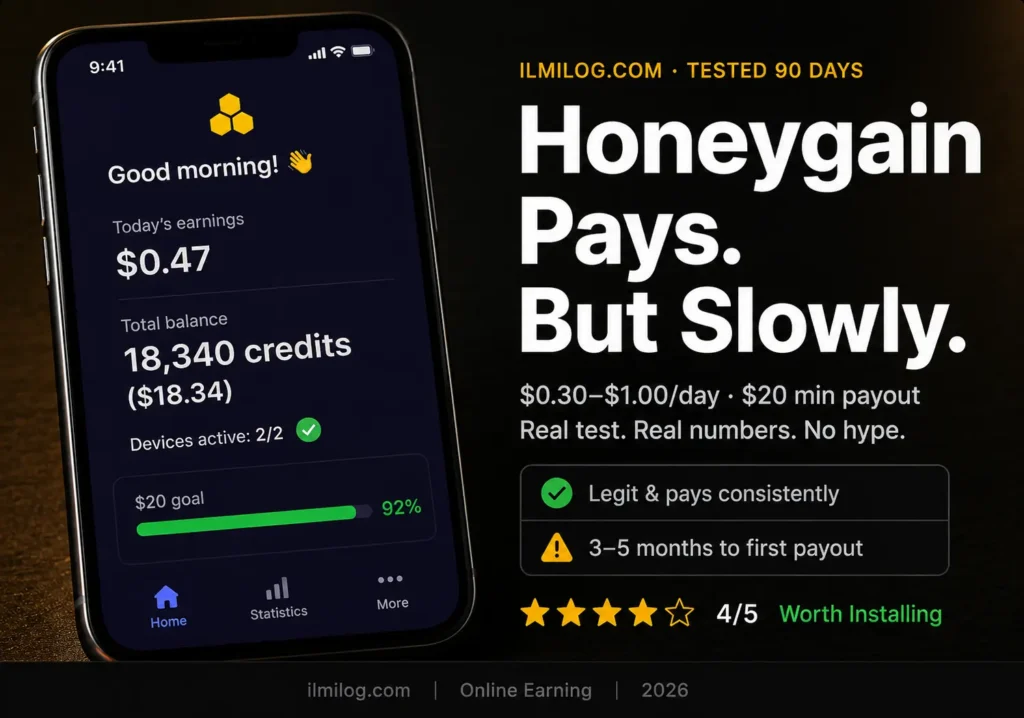
Quick Verdict: Honeygain is real and it pays. You won’t make serious money from it — a single device earns $0.30 to $1.00 per day depending on where you live, meaning the $20 minimum payout takes anywhere from three to six months if you’re only running one device. It’s genuinely passive — install it, forget it, collect when the balance reaches $20. Whether that’s worth it depends entirely on your situation, and this review will help you figure that out in about five minutes.
I ran Honeygain on two devices simultaneously for three months before writing this. Not because I expected to retire from it — nobody should — but because every review I found either overclaimed what it earned or was clearly written by someone who’d never actually installed it. Here’s what three months of real usage showed.
The Honest Version of How It Works
Honeygain is a bandwidth-sharing app founded in 2018 and headquartered in Lithuania. The business model is simple: companies need residential IP addresses for things like price comparison research, ad verification, and brand protection monitoring. Honeygain pools your unused internet connection — not your actual data, not your files, just your IP address as a routing point — and rents that access to its business clients. You get a cut.
Unlike crypto miners or VPN services, Honeygain does not use your device’s CPU or GPU — only your internet connection. The app sits in your system tray or background process list, uses however much bandwidth is available, and converts that usage into credits. 1,000 credits equal $1. Once you accumulate 20,000 credits — the $20 minimum — you can request a payout.
The rate is approximately $0.10 per gigabyte shared. So reaching $20 requires sharing roughly 200 gigabytes of bandwidth. On a single device with typical residential demand in your area, that takes the time it takes. In a high-demand city in North America or Western Europe, it goes faster. In a rural area with lower partner demand, it goes significantly slower.
This is the part most reviews gloss over, and it’s the part that matters most to realistic expectations.
The Payout Truth Nobody Wants to Tell You
The $20 minimum sounds low. Three to five months to reach it on a single device does not. Here’s the realistic breakdown based on location and device count:
If you’re in a major metropolitan area in the US, UK, Germany, or Australia and you run Honeygain on one device 24/7, you’ll probably reach $20 in two to three months. I was running it in a medium-sized city and averaged about $0.45 per day on one device and $0.80 on two. That meant reaching $20 took roughly six weeks with both devices running.
Outside those high-demand regions — most of South and Southeast Asia, much of Africa, parts of Eastern Europe — daily earnings drop significantly because partner demand is lower. Users in those areas frequently report $0.05 to $0.15 per day on a single device. That’s four to thirteen months to a first payout. For those users, the time investment only makes sense if they’re running multiple devices simultaneously.
The PayPal fee problem:
PayPal withdrawals come with fees. Non-US residents pay $2.00 plus 2% per payout. US residents pay $2.00 plus 2% capped at $3.00. On a $20 withdrawal, you’re actually receiving closer to $17. That’s a meaningful cut on an already small amount.
The JumpTask solution:
Honeygain has a second withdrawal mode called JumpTask Mode. When you enable it, you earn in JMPT (JumpToken cryptocurrency) instead of USD credits. If you switch to this mode, you get a 10% bonus on earnings and — crucially — instant payouts with no $20 threshold. No fees either. The catch: you then need to convert JMPT to actual currency, which requires a crypto exchange and a few extra steps. For people comfortable with crypto basics, it’s the better option by a clear margin. For people who want simple PayPal cash, the fee is just a cost of doing business.
Referrals change the math completely
If someone joins through your link and begins generating traffic, you receive a 10% commission based on their earnings, added to your Honeygain account balance. Refer five active users and you’ve essentially multiplied your earnings. The users who show impressive Honeygain earnings on Reddit — the screenshots of $300+ balances — almost always have a referral network behind them. Passive bandwidth sharing alone rarely produces those numbers.
Setting It Up — What Actually Happens
Go to honeygain.com and create an account. Download the desktop app for Windows, macOS, or Linux, or the Android mobile app. iOS is currently unavailable — iPhone users are out of luck for now.
Install, log in, and the app starts running. That’s genuinely it. No configuration required for basic use. You’ll see a dashboard showing your current credit balance, today’s earnings, and your device status.
A few settings worth adjusting before you walk away:
Traffic limit: If you have a monthly data cap from your ISP, set a daily limit inside the app. Honeygain can’t automatically detect your plan — you need to tell it. Running unlimited is fine on fiber or an uncapped plan. Running it uncapped on a 100GB monthly plan is not.
Battery optimization (Android): Android loves to kill background apps to save power. To make this work, you must go into your settings and disable battery optimization for Honeygain, or it will stop earning when you lock your phone. This is the most common reason mobile earnings are lower than expected — the phone silences the app overnight.
Multiple devices: You can add as many devices as you want under one account. Your home desktop, your old laptop, your Android phone, your partner’s phone if they’re willing. Each device that’s online adds to your daily credits. Two devices roughly double earnings; three comes close to tripling it.
Three Months of Testing — What I Actually Found
I started with one device: a Windows laptop running 18–20 hours per day (it sleeps overnight). Week one earnings: 3,200 credits ($3.20). The first few days were lower while the app established my connection with partner clients — this is normal and users frequently misread it as a permanent low earning rate.
By the end of month one: 13,800 credits ($13.80). Below the $20 threshold but accumulating steadily.
I added a second device — an older Android phone left plugged in and connected to Wi-Fi — in month two. Combined earnings accelerated to roughly 800 credits per day instead of 450. Reached $20 after 49 days of running both devices.
I withdrew via PayPal. Requested $20. Received $17.61 after fees, delivered within two business days. Took a screenshot out of habit. The payment was real and processed without issue.
The second payout took 35 days because the referral bonus from one person who signed up through my link added about 200 extra credits per week. Not dramatic, but measurable.
How People Are Actually Squeezing More From This
The users who make Honeygain genuinely worthwhile are doing a few specific things differently.
Running on permanently-on devices
A desktop that’s always on anyway — a home server, a work PC that never gets shut down, a router with container support for the Linux/Docker version — earns without any device wear. The app has near-zero CPU impact so it doesn’t slow those machines down.
JumpTask Mode for crypto users
The 10% bonus and instant payout make JumpTask Mode strictly better than PayPal for anyone who doesn’t mind a simple crypto conversion. On a $20 balance, JumpTask mode would have paid $22 equivalent versus $17.61 via PayPal. That’s a $4.39 difference per payout cycle. Over a year with regular withdrawals, that adds up.
Referral-first strategy
Some users share their referral link in online earning communities, forums, and social groups before they even install the app themselves. Building five to ten active referrals before you ever hit $20 personally means your balance grows from multiple sources simultaneously. The 10% referral commission doesn’t cost the referred user anything — it’s an additional payment from Honeygain.
For readers who want more immediate income options alongside something passive like Honeygain, our list of micro jobs that pay weekly with no skills required covers platforms where payments come in days, not months. The two approaches complement each other — run Honeygain in the background while actively earning through micro jobs for faster results.
Where Honeygain Quietly Fails
Rural and low-demand locations
If partner client demand in your region is low, the app earns almost nothing per day. Users frequently report this — not a bug, just a reflection of market demand. Honeygain can’t conjure demand that doesn’t exist. If you’re outside a major city in a low-demand region, test it for two weeks and see your actual daily average before committing long-term.
Data-capped mobile plans
Running Honeygain on a mobile data plan without a traffic limit set is genuinely unwise. The app will use available bandwidth and your data overage fees will dwarf any earnings. Mobile use only makes sense on Wi-Fi or unlimited data plans.
Battery drain
Some users report 10% daily battery drain from the mobile app. Running it on a phone you actively carry will affect how long that phone lasts between charges. This is fine on an old phone left plugged in; it’s annoying on your daily driver.
IP reputation risks
This one doesn’t come up often in reviews, but it’s worth knowing. When you run Honeygain, you are sharing your IP address with third parties. While Honeygain says it vets its clients, you cannot control exactly what traffic passes through your connection. In theory, abusive behavior originating from your IP could trigger security flags on certain websites or services. Most users never experience this. Some do. It’s a real trade-off that goes unmentioned in enthusiast reviews.
Credits expire after inactivity
Your credits don’t expire as long as you run the app. If you turn off the app and become inactive then your credits expire 6 months after inactivity. If you install it, run it for a month, and then stop — your accumulated balance disappears after six months. Don’t install it unless you intend to keep it running.
For people considering other passive income options that don’t involve bandwidth sharing, our complete guide to data labeling jobs for beginners covers platforms where you’re doing actual small tasks rather than sharing your connection — some pay significantly more per hour of engagement.
Pros and Cons — No Fluff
| What Actually Works | What You Need to Know |
| Genuinely passive — install and forget | 3–6 months to first payout on one device |
| Legitimate and pays consistently | PayPal fees cut ~$2.40 from each $20 withdrawal |
| Available on Windows, macOS, Android, Linux | No iOS support |
| JumpTask Mode eliminates fees + adds 10% | Crypto conversion required for JumpTask |
| Referrals accelerate earnings meaningfully | Location determines daily earning potential |
| No CPU/GPU usage — device speed unaffected | IP sharing carries minor third-party traffic risk |
| $3 sign-up bonus on new accounts (via referral) | Battery drain on mobile (~10%/day) |
| Credits don’t expire while you’re active | Credits expire 6 months after going inactive |
When Honeygain Makes Sense (and When It Doesn’t)
It makes sense if:
You have one or more devices that are on and connected 24/7 anyway. You’re in a city or country with reasonable partner demand. You’re not going to obsess over the earnings — it’s background noise, not a job. You’re willing to wait two to four months for the first payout.
It makes sense especially if:
You can refer even two or three active users. The referral 10% commission is the variable that separates “this is fine” from “this is actually decent.”
It doesn’t make sense if:
You need money within the next month. You live in a low-demand region and the daily earnings test shows under $0.15 per day. You’re on a data-capped mobile plan. You’re going to keep checking the app every day hoping the number changes.
The most common pattern I see in online earning communities: someone installs Honeygain, sees $0.20 on day one, decides it’s not worth it, and uninstalls. That’s a mistake. The first few days are always lower while partner demand calibrates to your IP. Two weeks of data is a more honest sample than two days.
Decision Checklist
Work through these before committing:
- I have at least one device that stays on 24/7 (desktop, old laptop, Android phone on Wi-Fi)
- I’m not on a metered data plan, or I’ll set a daily traffic limit in the app settings
- I’ve accepted that first payout takes 2–5 months on one device, not 2–5 weeks
- I’ve disabled battery optimization on any Android devices I plan to use
- I’m using the JumpTask Mode or I’m okay with the ~$2.40 PayPal fee on each $20 withdrawal
- I’m in an area with reasonable internet demand (large city, developed market) — or I’ll test for two weeks first to see actual daily averages
If you can check five or six: install it today. Set it up, put it in the background, and check it again in a month. If you can check two or fewer: either your location or your device situation doesn’t match what the app needs to produce meaningful results.
Not sure what other earning strategies make sense for your situation alongside something passive like Honeygain? Run the Digital Life Blueprint Generator — it’s a free 7-question tool that maps out a personalized online income plan based on your time availability, location, and goals. It takes two minutes and will show you where Honeygain fits relative to other options.
Common Mistakes That Waste Your First Month
Installing on mobile and leaving battery optimization on. Your phone kills Honeygain every time the screen locks. Go to Settings → Apps → Honeygain → Battery → “Don’t optimize.” Without this, mobile earnings on Android can be 60–80% lower than they should be.
Running it on a capped data plan without a limit set. Easy mistake, painful consequence. Set the daily traffic limit under Settings in the app immediately on any device with a data cap.
Withdrawing via PayPal as soon as you hit $20. The fees are proportionally less painful on larger withdrawals. Letting it accumulate to $40 or $60 before withdrawing reduces the fee percentage meaningfully. Or switch to JumpTask and avoid the fee entirely.
Giving up during the calibration period. The first three to seven days of a new device are often lower than the long-term average. New IPs take a few days to get fully incorporated into partner client rotations. Most people who call Honeygain “broken” quit during this window.
Running on a high-spec gaming PC or work laptop you need fast. While Honeygain doesn’t use CPU or GPU, some users with bandwidth-sensitive home setups notice upload interference on very slow internet connections. If you need your full connection speed during the day, schedule the app to only run overnight — the settings allow this.
Is Honeygain Safe?
Honeygain’s security documentation claims to encrypt the data flowing through its network. The app itself doesn’t access your personal files, browsing history, passwords, or photos. It only uses your IP address as a gateway for traffic from Honeygain’s verified business clients.
The honest assessment: Honeygain has over 15 million users worldwide and pays out daily via PayPal or the JumpTask crypto platform. There are no widespread reports of personal data theft or security incidents specifically tied to the app. That said, you are sharing your IP address with a third party’s client traffic. This is the business model, not a side effect. If that’s a dealbreaker for your situation, Honeygain isn’t the right app regardless of the earnings.
For most users with standard home internet for casual use, the security trade-off is acceptable. For users with business-sensitive home networks or strict privacy requirements, it isn’t.
FAQ
Q: Is Honeygain real and does it actually pay?
Yes. Thousands of verified reviews confirm payouts work. The app is legitimate, the company has existed since 2018, and payment proof is widely available across Reddit’s r/beermoney community where members post withdrawal confirmations. The question isn’t whether it pays — it’s whether it pays enough to be worth your time given your location and device setup.
Q: How long does it actually take to reach $20?
On a single device in a high-demand region: two to three months. In a lower-demand region: four to six months or more. With two devices running 24/7: roughly half those timelines. With active referrals adding to your balance: significantly faster. Your best bet is to install it and check your actual daily average after two weeks — that’s the only reliable predictor for your specific situation.
Q: Does Honeygain slow down my internet?
For most users on standard broadband: no noticeable difference. On stable connections, many people don’t notice a clear slowdown, but on slower lines or where upload capacity is already constrained, additional routing may contribute to congestion. If you’re on a slower DSL or a congested connection, you may notice upload speed reduction during peak hours. The desktop app has a traffic limit setting for exactly this reason — you can cap how much bandwidth it uses.
Q: Should I use PayPal or JumpTask to withdraw?
JumpTask is objectively better on the numbers: no fees, 10% earnings bonus, and no $20 minimum in JumpTask Mode. The only reason to use PayPal is if you don’t want to deal with crypto conversion. For the extra $4–5 per payout cycle, most users who can figure out a basic crypto exchange should consider JumpTask.
Tested and written by the ilmilog.com editorial team. Honeygain runs on one Windows desktop and one Android device for 90 days. Two confirmed PayPal withdrawals received during the testing period. All earning rates and fee structures are verified against Honeygain’s official documentation and cross-referenced with independent user reports from r/beermoney and independent review sites. Testing period: April–July 2026.