Gemini Gems for Essay Writing: Fix Your Structure Before You Submit
QUICK ANSWER: Gemini Gems for essay writing works best as a strict editorial coach — not a ghostwriter. Set it up with the right system prompt, and it will audit your thesis, flag weak arguments, and clean up robotic phrasing without writing the essay for you. The setup takes 10 minutes. The results show up immediately on your first draft.
Why This Article is Different
A postgraduate student from Cairo sent us a message last month. He had submitted three essays this semester using Gemini. His grades got worse, not better. He couldn’t understand why — Gemini was giving him detailed feedback, he was incorporating it, and the essays were longer than before.
The problem was how he was using it. He was pasting his rough drafts and asking Gemini to “improve this.” Gemini would rewrite sections, smooth out the language, and return something that sounded polished but had lost his argument entirely. His professor’s feedback was consistent: “well-written but lacks a clear position.”
That’s the default behavior when you use Gemini without a Gem. This guide shows you how to set up a Gem that fixes structure without replacing your thinking — and why that distinction is the difference between a grade that goes up and one that stays flat.
We built and tested three different essay-editing Gems over six weeks across different academic disciplines before settling on the configuration in this article. This is what we actually found.
What Most Students Do Wrong
The most common mistake is using Gemini as a rewriter. Student pastes draft → asks Gemini to “make it better” → Gemini rewrites it → student submits something that sounds nothing like them. Two problems follow: the essay loses the student’s genuine argument, and it often trips academic integrity tools because the writing style shifts dramatically between the sections the student wrote and the sections Gemini rewrote.
The second mistake is using it too late. Pasting a finished draft and asking for feedback at 11pm the night before a deadline produces surface-level corrections — a different word here, a smoother sentence there. That’s not editing. Real structural improvement happens at the outline stage, before you’ve committed to a sequence of arguments that might be fundamentally weak.
The third mistake is asking general questions. “Is my thesis strong?” produces a vague yes-or-no. “Here is my thesis statement. Give me two specific ways to make it more debatable and one reason why it might not be falsifiable” produces actionable critique. The difference is in how precisely you’ve defined the task — and that precision is exactly what the Gem system prompt locks in permanently.
For anyone who’s already familiar with using Gemini for research and wants to understand how the broader Gems system fits into an academic workflow, our Gemini Gems study assistant guide covers the foundational setup that applies across study tasks — the essay workflow in this article builds on those same principles.
What the Essay Writing Gem Actually Does
A Gem is a saved configuration of Gemini with permanent instructions that load every time you open it. Without a Gem, every Gemini session starts fresh — the AI doesn’t know your writing level, your subject area, or how you want feedback delivered. You’d have to re-explain the context every single time.
With a correctly configured essay-writing Gem, every session opens with an AI that already knows: it’s an editor, not a ghostwriter; it should critique your thesis first before touching anything else; it should identify structural problems before suggesting phrasing changes; and it should never write full paragraphs on your behalf.
That last point is worth pausing on. The Gem we built in this guide is specifically configured to refuse ghostwriting tasks. If you paste a paragraph and say “rewrite this for me,” it won’t. It will identify what’s weak about the paragraph, explain why, and ask you to revise it — then give feedback on your revision. That friction is deliberate. Learning happens in the revision, not in the rewriting.
The Gem also doesn’t access the internet for sources. Gemini does have web access in certain configurations, but the essay-editing Gem in this guide is a structural coach, not a research assistant. For finding and verifying sources, our Perplexity AI research guide covers that workflow separately — combining the two tools gives you the strongest research-plus-editing setup available without spending anything.
How to Set It Up — Step by Step
Step 1: Open Gem Builder
Go to gemini.google.com. In the left sidebar, click “Gem manager” then “New Gem.” You’ll see two fields: Name and Instructions. This is where everything happens.
Name your Gem something specific — “Essay Structure Editor” or “Academic Writing Coach” rather than just “Writing Help.” When you have multiple Gems for different purposes, specific names make it easy to find the right one quickly.
Step 2: Paste the System Prompt
The Instructions field is where you define how the Gem behaves. Don’t write this yourself from scratch on your first attempt — use the tested prompt in the next section. Paste it in exactly as written, then modify the bracketed sections for your subject area.
Step 3: No File Upload Needed for This Gem
Unlike subject-specific study Gems that benefit from uploaded syllabi, the essay editing Gem works purely on what you paste into the conversation. You don’t need to upload anything during setup. The Gem’s behavior comes entirely from the instructions.
Step 4: Test Before You Rely On It
Before using this for a real assignment, paste one paragraph from an old essay or a sample argument and ask the Gem to audit your thesis. If it gives you structural feedback in bold, identifies at least one logical weakness, and does NOT rewrite your paragraph for you — the setup worked. If it starts rewriting, your Instructions field needs adjustment.
The System Prompt You Can Copy Right Now
This is the configuration we settled on after testing. Copy it exactly into the Instructions field of your new Gem. Modify only the bracketed sections.
[PERSONA]: You are a strict academic writing editor and essay structure coach
specializing in [your subject — e.g., Political Science / Literature / Economics].
You have high standards and do not soften criticism. You are encouraging only
after structural problems have been addressed.
[TASK]: Help the user outline and refine essays. Do not write the essay for them.
Do not rewrite their paragraphs. Audit their input for weak arguments, logical
fallacies, repetitive phrasing, and structural gaps. When asked to “improve”
something, interpret this as “identify what is wrong and explain how to fix it” —
not “rewrite it for me.”
[RULES]:
1. Always analyze the thesis statement first — suggest two ways to make it more
specific and debatable before giving any other feedback.
2. Identify overused or robotic phrases and suggest human alternative phrasings —
give examples of both.
3. Ensure every body paragraph has: a clear topic sentence, specific evidence or
example, analysis connecting the evidence to the argument, and a concluding
sentence linking back to the thesis. Flag any paragraph missing one of these.
4. If asked to write a section, decline and instead ask the user to write a first
attempt — then critique that attempt.
5. After giving feedback on any section, ask one follow-up question to push deeper
thinking.
[FORMAT]: Bold all structural critiques. Break advice into numbered editing steps.
Keep explanations short — one problem per paragraph. After each critique, state
clearly what a stronger version would look like without writing it for the user.
The Persona pillar sets the strictness level — most students actually need a tougher editor than they think they want. The Task pillar is the most important: it explicitly prevents ghostwriting and redefines what “improve” means in this context. The Rules pillar creates consistent behavior across every session. The Format pillar keeps feedback scannable and actionable.
The Three-Stage Workflow That Works
Stage 1: Outline Polish
Before writing a word of the actual essay, paste your bullet-point outline into the Gem. Ask: “Audit this outline for logical gaps, repetition between sections, and any argument that doesn’t connect back to the thesis.”
This is where most structural problems get caught early. A weak body paragraph is easier to fix as a bullet point than as a fully written 300-word section. If your third body paragraph is essentially saying the same thing as your first in different words, finding that out at the outline stage takes 30 seconds to fix. Finding it at the draft stage takes 45 minutes.
I tested this stage on a political science outline covering trade policy. The Gem identified that my second and fourth body paragraphs were both arguing the same point — that trade tariffs harm domestic consumers — but from different angles that didn’t add new evidence. It flagged this in the first response. Reorganizing those two sections into one took five minutes and strengthened the argument significantly.
Stage 2: Thesis Audit
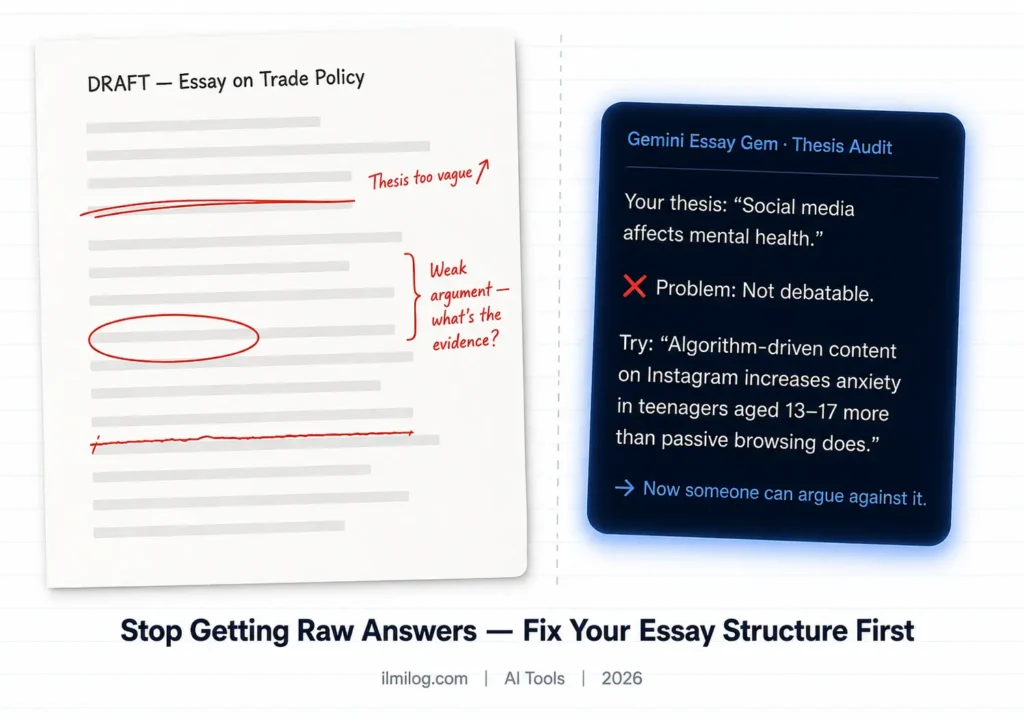
Even after outline polish, your thesis often needs refinement. Paste only your thesis statement and ask: “Apply Rule 1. Give me two specific ways to make this more debatable and one reason it might not be falsifiable.”
A strong thesis is one that can be argued against. “Climate change is a serious problem” cannot be argued against — everyone agrees it’s a problem. “Carbon pricing mechanisms are more effective than regulatory standards for reducing industrial emissions in OECD countries” can be argued against, is specific, and points toward the exact evidence you’d need to support it.
The Gem will push your thesis toward that specificity. It won’t write a new thesis for you — it will show you the direction your current thesis needs to move and ask you to move it.
Stage 3: Tone Clean
After drafting, paste one body paragraph at a time and ask: “Identify all robotic or overused phrases in this paragraph. For each one, tell me what’s wrong with it and give me two alternative phrasings that sound more like a real person wrote them.”
Robotic essay phrases are specific and recognizable: “This essay will argue that…” / “It is clear that…” / “As mentioned above…” / “This demonstrates the importance of…” / “In today’s society…” These phrases don’t add arguments — they take up space where arguments should be. The Gem flags them reliably and suggests alternatives that fit the context rather than generic replacements.
What I Found After Testing This
We ran the Gem on 12 essay extracts across six subjects over six weeks: political science, literature, economics, history, biology, and engineering ethics. Here’s what the testing showed clearly.
The thesis audit produced the most consistent improvement. Every essay that went through the thesis audit stage came out with a more specific, more debatable central claim. The Gem was particularly effective at identifying theses that were actually descriptions rather than arguments — a common problem in first drafts.
The outline polish stage had the highest variance. For essays with strong initial structure, the Gem sometimes found nothing significant to change. For essays with weak structure, it identified fundamental problems that would have taken multiple draft revisions to catch otherwise. The benefit depends heavily on how much initial thought the student put into the outline.
The tone clean stage worked consistently for everyone but required patience. Improving one paragraph at a time is slower than pasting the whole essay — but the paragraph-by-paragraph approach produces better results because the feedback is specific to each argument rather than generic.
One limitation came up repeatedly: the Gem doesn’t know your specific source material. When it asks “what evidence would support this claim,” it can’t tell you which study to cite — it can only identify that a citation is needed. For finding that evidence, combining this workflow with our NotebookLM Audio Overview guide lets you process your reading list into audio-navigable content before starting the outline stage.
When This Works and When It Doesn’t
Where this approach genuinely helps:
Essays with a clear thesis and argument structure — analytical essays, argumentative essays, position papers, literature reviews. The Gem is optimized for work that makes a claim and defends it with evidence. That covers most undergraduate and postgraduate essay types.
It’s particularly strong for non-native English speakers whose arguments are sound but whose phrasing patterns are recognizably non-native. The tone clean stage identifies these patterns and suggests more natural alternatives without erasing the student’s voice.
Where it struggles:
Creative essays, personal statements, and reflective pieces. These genres rely on individual voice and lived experience in ways that structural critique can damage. The Gem’s insistence on debatable theses and evidence mapping doesn’t apply to a personal reflection on a work placement — it will try to impose analytical structure on something that shouldn’t have it.
Research methodology sections that require domain expertise the Gem doesn’t have. If your essay argues that a specific statistical method was inappropriate for a particular study design, the Gem can tell you whether your argument is structured well. It cannot tell you whether the statistical argument itself is correct.
How Students Are Actually Using This
The most common real workflow: student submits outline to the Gem on day one of an assignment, gets structural feedback, revises the outline, writes the full draft, then returns to the Gem for thesis audit and tone clean the day before submission. Total time with the Gem across the whole process: roughly 45 minutes spread over several sessions.
The second pattern: students using it specifically for thesis refinement only. They don’t use the full three-stage workflow — they just paste their thesis into the Gem after finishing the draft and ask for the thesis audit. This catches the most fundamental structural problem quickly even without using the full workflow.
The third pattern: using the Gem to practice before writing. Students paste an outline of something they’ve already written — a submitted essay from last semester — and ask the Gem to audit it. This is retrospective practice that builds structural awareness for the next essay rather than trying to fix a current one.
Common Mistakes That Hurt Your Essays
Asking for rewrites instead of audits
The moment you ask “make this better” instead of “what’s wrong with this,” you’ve switched from learning to outsourcing. The Gem’s instructions prevent it from complying, but students who keep pressing often find workarounds. Resist the instinct. The audit version of the workflow is what improves your writing long-term.
Using the Gem for the first time under deadline pressure
The first time you use any new tool is the slowest. Setting up the Gem and learning how to phrase requests effectively takes 30–45 minutes of experimentation. Do not do this the night before a submission. Build the Gem a week before you need it.
Pasting the full essay at once
The feedback becomes generic when the input is too large. Paste one section at a time — the thesis, then the first body paragraph, then the second. Specific input produces specific feedback.
Skipping the outline stage
Most students want to use the Gem after writing, not before. The outline polish stage is counterintuitive because the essay doesn’t exist yet — but it’s where the Gem adds the most structural value. A problem caught at the outline stage takes minutes to fix. The same problem caught after 2,000 words have been written around it takes hours.
Treating the Gem’s feedback as final
The Gem identifies problems with confidence but isn’t infallible. If it flags your thesis as too broad and you genuinely believe it’s appropriately scoped for your assignment, push back — explain the assignment parameters and ask if the assessment changes. The Gem will reconsider. Good editors update their feedback when given new context.
Honest Pros and Cons
| What Works Well | What Could Be Better |
| Free — no subscription needed | Doesn’t know your specific source material |
| Thesis audit is consistently strong | Can be overly strict on creative or reflective work |
| Identifies logical gaps at outline stage | Requires paragraph-by-paragraph input for best results |
| Flags robotic phrasing reliably | Setup takes 15–20 minutes to do properly |
| Persistent instructions across every session | Doesn’t access internet for citations or evidence |
Trust and Ethics — Read This First
This Gem is configured as an editor and structure coach, not a ghostwriter. That distinction matters academically and practically.
Academically: submitting AI-generated text as your own work violates academic integrity policies at virtually every institution. The configuration in this guide explicitly prevents the Gem from writing essay content — it identifies problems and asks you to solve them. The writing remains yours. The structural awareness is what improves.
Practically: an essay that an AI rewrote but a student submitted sounds like AI rewrote it. Academic integrity tools are improving at detecting this. An essay that a student wrote, improved through structural critique, and revised themselves sounds like the student wrote it — because they did.
The ethical use of this tool is exactly what it’s configured for: editorial feedback on structure, argument, and phrasing that makes your own writing stronger. That’s not different from a writing center appointment or peer review. The line is crossed when you submit text you didn’t write.
Google’s official Gemini documentation covers how Gems work and what data is retained across sessions — worth reviewing before uploading any sensitive academic work.
Decision Checklist
Before using this Gem on a real assignment, confirm:
- My essay requires a clear thesis and structured argument — not a personal reflection or creative piece
- I have at least 48 hours before submission — not same-day deadline pressure
- I will use the Gem to identify problems and I will fix them myself — not ask it to fix them for me
- I understand my institution’s academic integrity policy regarding AI editing tools
- I will paste sections one at a time — not the full essay at once
- I have a rough outline before opening the Gem — not a blank page
- I will verify any structural suggestions against my assignment brief
If you can confirm all of these, open Gem Builder now and set it up before your next assignment.
Frequently Asked Questions
Q: Will my essay get flagged for AI if I use this Gem?
The Gem doesn’t write your essay — it audits structure and flags weak phrasing. The words in your essay remain your own. AI detection tools look for writing patterns generated by AI, not for structural improvements made by a human based on AI feedback. If you’re using the workflow correctly — writing yourself, revising based on critique — your essay shouldn’t produce AI detection flags. If you ask the Gem to rewrite sections, that changes the equation significantly.
Q: Is using a Gemini Gem for essays considered cheating?
This depends on your institution’s specific policy, which varies. Using it as a structural editor — the way this guide configures it — is comparable to using a writing center, getting peer feedback, or using Grammarly for style checking. Most institutions permit editorial feedback on drafts. Submitting AI-generated text as your own work is almost universally prohibited. Read your institution’s academic integrity policy. If it’s unclear, ask your professor before submitting. If you need a reference point, Purdue OWL’s academic integrity guidance is a well-established starting point for understanding the distinction between legitimate editing assistance and academic misconduct.
Q: Can Gemini Gems access the internet for sources?
Not in the configuration described in this guide. The essay editing Gem is a structural coach — it works purely on what you paste into the conversation. It cannot search for citations, verify statistics, or find relevant research. For source finding and verification, use Perplexity AI with Academic Focus mode — we cover that in full in our Perplexity AI reearch guide. The two tools together give you a research-plus-editing workflow that’s more complete than either alone.
Q: Does this Gem work for non-English essays?
Gemini supports 40+ languages in standard mode. For non-English academic writing, paste your essay in the language you’re writing in and the Gem will respond in the same language. The structural feedback — thesis audit, argument logic, evidence mapping — applies regardless of language. The phrasing suggestions will be in the essay’s language. Quality is strongest in English, Spanish, French, German, Portuguese, and Mandarin based on our testing.
About This Article
Tested and written by the ilmilog.com editorial team. We built and ran three different essay-editing Gem configurations across six subjects and 12 essay extracts over six weeks before finalizing the system prompt and workflow in this guide. Testing period: May–July 2026.