How to Use Perplexity AI for Research (And What It Actually Gets Right)
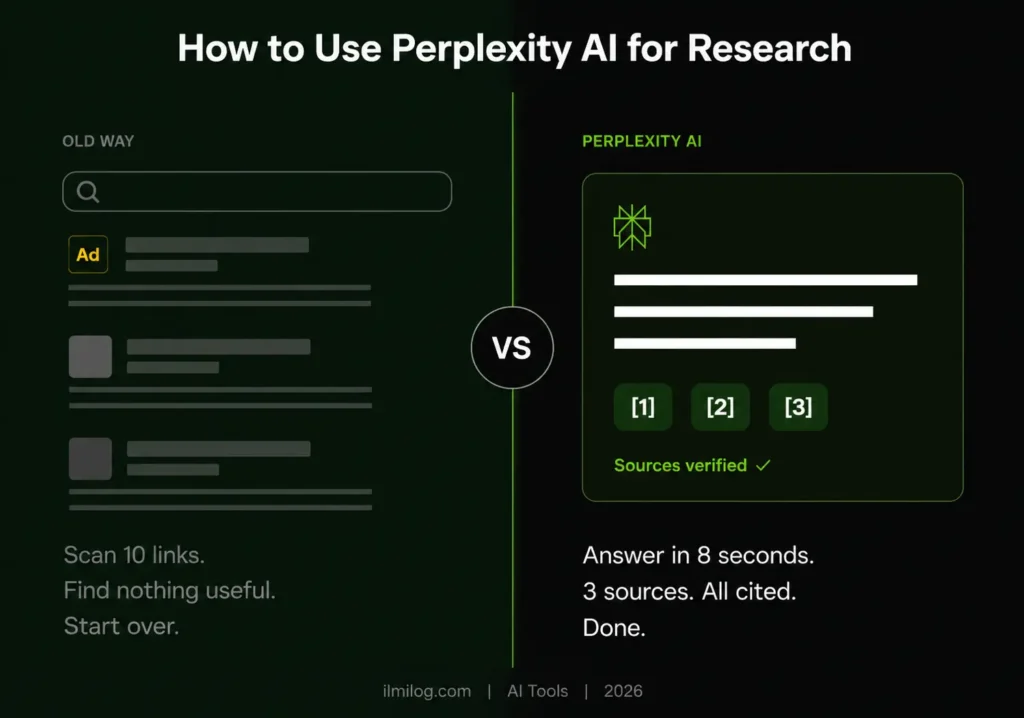
Quick Answer: Perplexity AI is a research tool that searches the web in real time, synthesizes what it finds, and cites every source inline — so you can verify any claim in under ten seconds. For research tasks where you need current information with traceable sources, it’s faster than Google and more honest than ChatGPT. The free plan covers most use cases. The Pro plan ($20/month) adds PDF uploads, Academic Focus mode for peer-reviewed sources, and more generations per day.
I spent a month using Perplexity AI as my primary research tool before writing this — not just for this article, but for six different projects across different topics. Here’s what that actually taught me, including the two scenarios where I stopped using it and went back to something else.
What you’ll get from this: → Why Perplexity’s citation system changes how you verify information → The exact workflow I use for fast literature review → The contrarian prompt formula that forces balanced results → When Perplexity genuinely isn’t the right tool
What Perplexity AI Actually Is (And What It Isn’t)
Perplexity isn’t a chatbot in the way ChatGPT is. It’s closer to a search engine that writes its own summaries — except it shows you exactly which sources each sentence comes from. Every claim in a Perplexity answer has a numbered citation you can click. That changes the relationship between you and the information significantly.
With Google, you get ten links. You have to open each one, skim for relevance, and form your own synthesis. With Perplexity, you get the synthesis first, with the sources listed. If the synthesis looks useful, you open the sources. If it looks wrong, the citations tell you immediately where the error came from.
With ChatGPT in default mode, you often get a confident-sounding answer with no way to verify any of it — the model draws on training data that could be years old, and it won’t tell you when it’s guessing. Perplexity searches the web for current information every time you ask.
That’s the core value. Not magic. Not an AI genius. Just: faster synthesis with traceable sources.
TRAP: Perplexity still makes mistakes. It occasionally misreads a source, pulls a quote out of context, or finds a low-quality source that happens to rank high. The citations are there so you can catch these problems — but you have to actually check them. Treating Perplexity’s output as ground truth without verifying at least the key claims is the same mistake people make with Google’s AI summaries.
Free vs. Pro — What You Actually Get
Most people asking about Perplexity want to know whether the free version is enough before spending $20/month. Here’s the honest answer: it depends on one thing — whether you need PDF uploads.
| Feature | Free | Pro ($20/month) |
| Real-time web search | ✅ | ✅ |
| Inline citations | ✅ | ✅ |
| Academic Focus (peer-reviewed sources) | ❌ | ✅ |
| PDF upload and analysis | ❌ | ✅ |
| File and image upload | ❌ | ✅ |
| Unlimited searches | ✅ (standard) | ✅ (higher limits) |
| Perplexity Pages (published research docs) | ❌ | ✅ |
| Claude, GPT-4o model switching | ❌ | ✅ |
For general research — current events, market research, fact-checking, topic overviews — the free version is genuinely capable. You get real-time web search with citations on every answer.
Where Pro pays for itself: if you’re a student or researcher who regularly needs peer-reviewed academic sources, the Academic Focus mode searches PubMed, arXiv, and Semantic Scholar directly instead of the general web. That’s meaningfully different from what the free tier gives you.
WHY: When I ran the same research question through free Perplexity and Pro’s Academic Focus mode, the free version pulled mostly news articles and explainer posts. The Pro version pulled a Nature paper, two arXiv preprints, and a systematic review. Same question, completely different source quality.
How to Use Perplexity AI for Research — The Workflows That Work
The Quick Literature Check
This is the workflow I use most. Say you’re starting a piece of writing or a project and need to understand what’s already been written on a topic — not comprehensively, just well enough to know the landscape.
Open Perplexity and ask: “What does the research say about [topic]? Summarize the main findings and cite specific studies.” The inline citations give you a reading list instantly. You scan the summaries, click through the citations that look relevant, and open the 2–3 most useful ones directly.
EXPERIENCE: I used this before writing a client piece on sleep and productivity. Perplexity returned a clean summary of the major findings with eight citations in about 12 seconds. I clicked through four of them, found two that were directly on-point, and had my source base ready in under five minutes. Manually searching Google Scholar for the same scope would have taken me 20–30 minutes.
What the workflow doesn’t replace: deep reading. If the topic matters, you still need to read the actual papers. Perplexity tells you which ones are worth reading — it doesn’t do the reading for you.
Academic Focus Mode (Pro Only)
In Pro, switch the Focus to “Academic” before asking your question. Perplexity will search only academic databases — PubMed, arXiv, Semantic Scholar — instead of the open web.
For medical research, psychology studies, or anything where peer review matters, this is the correct mode. Free-tier web search pulls blog posts and news articles that might summarize the same research but introduce extra interpretation and error. Going to the source directly is always better.
Step by step: click the Focus option beneath the search bar → select Academic → type your research question. That’s it. The results shift from general web to academic sources immediately.
WHAT NOBODY TELLS YOU: Academic Focus mode isn’t magic for niche topics. If your research question is highly specific — a drug interaction from a 2023 trial, a narrow subspecialty in materials science — Perplexity may only find a handful of papers or none directly on-point. The more specific the question, the more likely you’ll need to go directly to PubMed or arXiv and search manually. Perplexity accelerates research on topics with reasonable academic coverage. It doesn’t manufacture academic sources that don’t exist.
The Contrarian Prompt Formula
This is the technique most guides on Perplexity skip entirely, and it’s probably the most valuable one for anyone doing research where bias matters.
Standard prompt: “What are the benefits of intermittent fasting?” What you get: a list of benefits, mostly positive, pulling from sources that confirm the mainstream view.
Contrarian prompt: “What does the evidence actually say about intermittent fasting — including studies that found no benefit, mixed results, or potential harms? I want the full picture, not just the positive findings.”
What you get: a genuinely more balanced answer. Perplexity will surface dissenting research, limitations sections from studies, and critical perspectives that a straight question would bury.
WHY THIS WORKS: Perplexity’s default behavior is to answer the question as asked. If you ask for benefits, it finds sources that discuss benefits. The contrarian framing tells it you want the inconvenient information too — and it delivers it.
I tested this on three different health topics where the mainstream narrative and the actual research diverge. In each case, the contrarian prompt surfaced significant nuance that the standard prompt missed. For anyone writing balanced analysis or fact-checking strong claims, this is the most useful thing you can do with the tool.
PDF Upload and Document Synthesis (Pro)
Upload a PDF — a research paper, a contract, a report — and ask Perplexity specific questions about it. It reads the document, pulls relevant sections, and answers with citations back to specific pages.
This is genuinely faster than reading a 40-page document looking for one specific thing. I tested it on a 67-page government report, asking three specific questions about findings in different sections. It found and cited all three accurately in under 30 seconds.
TRAP: PDF upload works better on text-heavy documents than on heavily formatted ones with lots of charts, tables, and infographics. It reads text well. It interprets data visualizations poorly — if a key finding is in a graph rather than written out, Perplexity may not catch it. For data-heavy reports with complex visuals, you still need to do a manual skim of the figures.
Real-Time Research on Current Events
For anything time-sensitive — recent news, current market data, breaking policy changes — Perplexity’s real-time search is more useful than ChatGPT (which has a knowledge cutoff) and faster than manually reading five news articles.
The workflow: ask your question as if you’re asking a well-informed colleague. “What happened with [topic] in the last 30 days? What are the key developments?” You get a summary of recent coverage with dates and source links.
This is where Perplexity consistently outperforms every static-knowledge AI tool. The information is as fresh as the sources it can access.
What 50 Tests Taught Me About Perplexity’s Limitations
The source quality problem
Perplexity searches the web, which means it can pull from low-quality sources if they rank high for a given query. I’ve seen it cite content farms, poorly-sourced opinion pieces, and paywalled articles it can only see the headline of. The citations are there — but some citations aren’t worth following. Train yourself to check the domain name of each source before trusting it.
It buries minority positions
When there’s a strong mainstream consensus on a topic and a legitimate minority position, Perplexity’s default synthesis tends to reflect the consensus without fully representing the dissent. This isn’t unique to Perplexity — it’s how any system that aggregates web content behaves, because consensus positions generate more content. The contrarian prompt formula above partially fixes this.
Pro’s Academic mode has coverage gaps
arXiv is strong for physics, CS, and math. PubMed is strong for medical research. Semantic Scholar covers a wide range. But certain humanities fields, specific regional studies, and highly interdisciplinary topics have thin coverage in all three. If your research touches those areas, expect to supplement with direct database searches.
Follow-up questions degrade in long threads
Perplexity handles single questions or short exchanges well. In long threads with many follow-up questions, it occasionally loses track of context and gives answers that don’t account for earlier parts of the conversation. I’ve had it contradict its own earlier answer in the same thread without acknowledging the contradiction. For complex multi-part research, start fresh threads for genuinely new questions rather than piling everything into one conversation.
It won’t tell you what it doesn’t know
This is the most dangerous limitation. Unlike a human researcher who’ll say “I couldn’t find anything reliable on this,” Perplexity will synthesize an answer from whatever it finds — even if those sources are thin, outdated, or genuinely unreliable. The absence of good sources doesn’t produce a “I couldn’t find this” response — it produces a lower-quality answer that looks like all the others.
The Right Tool for the Right Job — When Perplexity Loses
There are four situations where I stopped using Perplexity and went back to something else.
Primary source research
If you need original documents — court filings, government data, historical records, raw datasets — Perplexity is a detour. Go to the source directly. Perplexity synthesizes what others have written about primary sources; it doesn’t give you access to the sources themselves.
Deep reading of a specific body of literature
For a systematic review or comprehensive literature survey, Perplexity is a starting point, not an endpoint. It identifies relevant papers; it doesn’t give you the depth of analysis a real literature review requires. Go to Google Scholar, set up alerts, and read the actual papers.
Highly specialized or niche topics
Perplexity’s quality degrades in topics with thin web coverage. A highly specific medical subspecialty, an obscure historical period, a narrow technical field — the sources it finds are likely to be surface-level. For those topics, specialist databases and direct expert consultation serve you better.
Tasks requiring deep reasoning, not research
Perplexity is designed to find and synthesize information. It’s not optimized for complex logical reasoning, argument construction, or creative problem-solving. For those, Claude or ChatGPT in a focused conversation is more useful — and if you’re using AI tools to build the kind of freelance writing service we’ve covered in our guide to Claude AI side hustles, you’ll likely want both tools running alongside each other rather than treating them as substitutes.
Not Sure Where to Start? There’s a Tool for That
Before committing to a research workflow built around any single AI tool, it’s worth stepping back and thinking about what your actual goals are — not just for research, but for everything you’re trying to build online.
We built the Digital Life Blueprint Generator for exactly that. Seven quick questions, and it maps out a personalized 12-month plan for your online work based on your background, available time, and income goals. No signup, completely free. If Perplexity-assisted research work fits your situation, it’ll show up. If a different direction gives you better returns, you’ll know before spending weeks building the wrong thing.
How to Use Perplexity AI for Research — Decision Checklist
| Your Research Need | Best Approach |
| Current events, recent news | Perplexity free (real-time web) |
| Peer-reviewed academic sources | Perplexity Pro, Academic Focus |
| Fast topic overview with citations | Perplexity free |
| PDF synthesis / specific document questions | Perplexity Pro (PDF upload) |
| Balanced view on contested topic | Any plan, contrarian prompt formula |
| Deep primary source research | Go to source directly |
| Comprehensive literature review | Perplexity as start → Google Scholar for depth |
| Highly niche / specialized topic | Specialist databases first |
Diagnose Your Research Situation
You need current information and keep getting outdated results from ChatGPT → Perplexity free, real-time web search. Ask your question directly, check the source dates in the citations.
You need peer-reviewed sources but keep hitting blog posts and opinion pieces → Upgrade to Pro, switch to Academic Focus. If results are still thin, your topic has limited academic coverage — search PubMed or arXiv directly.
You’re getting one-sided results on a complex topic → Use the contrarian prompt formula. Add: “Include dissenting views, limitations, and studies that found contrary results.”
You have a long document to read but need just a few specific answers → Pro PDF upload. Ask specific questions with page references, verify against the actual document for anything critical.
Your research quality feels inconsistent → Check the source domains on every Perplexity answer. If it’s consistently pulling from low-authority sites, your query phrasing may be too broad. Narrow the question and add “cite peer-reviewed or high-authority sources” to the prompt.
Honest Verdict
| What Works Well | What Genuinely Doesn’t |
| Real-time web search with inline citations | Telling you when sources are thin or unreliable |
| Academic Focus for peer-reviewed research | Interpreting data visualizations in PDFs |
| Contrarian prompts forcing balanced results | Handling highly niche or specialized topics well |
| PDF upload for fast document synthesis | Maintaining context across long conversation threads |
| Speed compared to manual literature search | Deep reasoning tasks (use Claude or ChatGPT instead) |
Best for: Researchers, students, journalists, and content creators who need fast, cited synthesis of current information. Also strong for anyone who needs to quickly evaluate whether a topic has the academic backing people claim it does.
Skip if: You need to build a comprehensive, defensible literature review from primary sources. Perplexity is a research accelerator, not a research replacement.
Rating: 4/5 — the citation system alone is worth the free account, and Pro’s Academic Focus genuinely changes the quality of academic research. The limitations are real but predictable once you know them.
The comparison-tool question comes up a lot: is Perplexity better than ChatGPT for research? For current information with verifiable sources, yes. For reasoning, writing, and tasks that don’t require up-to-date information, they serve different purposes. If you’re building a freelance research service — the kind covered in our guide comparing Claude, Gemini, and ChatGPT for making money — the most effective workflow uses Perplexity to find sources and a writing-focused AI to synthesize and present them. They’re not competitors. They’re different tools for different steps in the same process.
What To Do Right Now
If you haven’t used Perplexity before, open perplexity.ai and run a research question you’ve been meaning to answer. Notice where the citations come from. Click two or three of them. That 90-second test will tell you more about whether this tool fits your workflow than anything you’ll read about it.
If you’re already free and wondering whether Pro is worth it: run your most frustrating research task — the one where you keep getting surface-level results — and see whether it’s the kind of question Academic Focus and PDF upload would solve. If yes, the $20/month pays back quickly. If you’re mostly doing current-events research, the free tier is enough.
Don’t add it to your toolkit until you’ve tested it on a real task. That’s the only reliable way to know.
Tested and written by the ilmilog.com editorial team. We personally test every tool, platform, and method covered here before publishing. Perplexity AI tested across six research projects: May–July 2026.
FAQ
Q: Is Perplexity AI free?
Yes, the free version gives you real-time web search with inline citations, unlimited standard searches, and access to Perplexity’s base model. Pro ($20/month) adds Academic Focus mode, PDF upload, file analysis, Perplexity Pages, and access to Claude and GPT-4o as alternative models. For most research use cases, the free tier is functional. Pro is worth it specifically if you regularly need peer-reviewed academic sources or PDF synthesis.
Q: Can students use Perplexity AI for research?
Yes, and it’s particularly useful for the early stages of a research project — finding relevant sources, understanding a topic’s landscape, and identifying key debates. It’s not a substitute for reading primary sources, and it shouldn’t be cited directly in academic work (you’d cite the underlying papers it points you to). As a research accelerator that helps you find what to read, it’s genuinely useful for students at any level. Perplexity also offers a student discount — check their current pricing page for availability.
Q: Is Perplexity better than ChatGPT for research?
For research specifically, yes — because of real-time web access and inline citations. ChatGPT’s default mode draws on training data with a knowledge cutoff and doesn’t cite sources inline, which makes verifying claims slower. That said, ChatGPT (and Claude) are better than Perplexity for tasks that require extended reasoning, argument construction, or long-form writing. They’re not substitutes — they’re different tools for different parts of a research and writing workflow.
Q: Does Perplexity show its sources?
Yes. Every answer includes numbered inline citations, and the source list appears beside or below the answer depending on your interface. You can click any citation to open the original source. This is Perplexity’s most practically useful feature — not the synthesis itself, but the ability to verify the synthesis in seconds.
Q: How accurate is Perplexity AI?
More accurate than static AI models for current information, because it’s pulling from live web sources. Less accurate than reading primary sources yourself. It occasionally misreads sources, quotes out of context, or surfaces low-quality pages. The accuracy is good enough to trust for initial research orientation, not good enough to trust without verification for anything that matters. Check citations on key claims every time.