AI Products on Etsy From Pakistan: What’s Allowed (2026)
Etsy lets you sell designs made with AI. It doesn’t let you pass them off as handmade, and it doesn’t let you sell prompts on their own. Those two rules sit underneath almost everything else on this topic, and most beginner videos skip both.
The honest picture is a little less exciting than the thumbnails suggest. AI makes it fast to produce a design, and that’s exactly why so many people are doing it. Anything that’s easy to make in bulk gets crowded quickly, and prices get pushed down along with it. The sellers who do well usually treat AI as a fast starting point and then add something of their own: a clear niche, careful editing, a finished product that actually works for the buyer.
Everything here assumes your shop already exists and Payoneer is connected. If it doesn’t, finish the account setup first, because a shop that can’t receive payments is just a portfolio.
Before writing any of this, I read through Etsy’s published policy pages and compared the current free plans of the main image tools. Tool limits change often, so treat the tool details as a snapshot in October 2026. The Etsy rules are the part that matters most.
Two Rules to Read Before Picking Any Idea
Etsy sorts every item into one of four labels: made by, designed by, sourced by, or handpicked by the seller. Etsy’s own creativity standards explain each one, and AI artwork belongs under “designed by.” Not “made by.” An AI image with the wrong label is one of the quickest ways to get a listing pulled.
The second rule is disclosure. Etsy expects you to say plainly in the listing description when AI was used to create the item. One honest sentence is enough, something like: “The artwork in this listing was created with AI image tools from my own prompts, then edited and finished by me.” Put it near the top of the description, not buried at the bottom where nobody reads.
There’s a third rule that catches a lot of people who learned about Etsy from YouTube. Listings that sell AI prompts by themselves aren’t allowed. A listing for finished AI artwork can include the prompts as a bonus, but the prompts can’t be the product. If you’ve seen prompt packs selling on other platforms, don’t assume Etsy treats them the same way.
Etsy also runs automated checks, and some sellers report that correctly labelled listings still get flagged now and then. Keep your prompts, drafts, and edited files saved in a folder. If a listing gets questioned, proof of your process makes that conversation much easier.
Green Light: Products That Fit the Rules and the Market
These are the product types where AI genuinely helps and the finished item still needs a human to make it work.
Printable planners and trackers
AI handles the decorative side: illustrated headers, border art, small icons. You handle the part that makes the product useful, which is the layout, the spacing, and the way a week actually fits on a page. Buyers can tell the difference between a planner someone thought through and a pretty picture with boxes on it.
Clipart sets and digital sticker sheets
Crafters and small business owners buy sets because they need a consistent look across many items. AI is good at producing a themed batch in one style. Your job is to pick the best pieces, clean up the rough edges, and sell them as a matched set instead of a random folder of images.
Seamless patterns and digital papers
People who make their own cards, journals, or packaging buy patterns by the pack. Patterns forgive small AI quirks far better than faces or hands do, which makes this one of the gentler starting points.
Custom pet or family portraits
Etsy’s own policy mentions a custom portrait of a buyer’s pet made with AI tools as an allowed example. It’s more hands-on than the others, because every order needs a buyer photo, a few revisions, and clear disclosure. It suits someone who enjoys talking to buyers, and it suits nobody hoping for pure passive income.
If you’d like a wider look at which digital categories tend to find buyers first, beyond AI-made ones, this ranked list of product ideas is a useful companion to this section.
Yellow Light: Works, But Needs Extra Care
Wall art prints
This is the most crowded corner of AI on Etsy. Misty landscapes and abstract swirls are everywhere. What still gets noticed is a specific theme for a specific buyer, like a reading nook, a kids’ room, or a clinic waiting room, presented as a matching set rather than one lonely image.
Anything with words inside the image
Image tools still garble text. For English, you can usually fix this by generating the image without text and typing the words yourself in Canva. For Arabic and Urdu script the stakes are higher. AI often produces letters that look right but aren’t, and a mistake in a Quranic verse or a dua isn’t a small typo. If you sell Islamic or Urdu calligraphy, type the text yourself from a trusted source, then ask someone who reads it well to check the final file before it goes live.
Digital planners for tablets
AI can design the covers and stickers. The linked tabs and page structure are your work, and that’s the part buyers are really paying for.
Print-on-demand designs
The same disclosure rules apply, plus extra care around trademarks and characters. AI tools will happily produce something that looks a lot like a famous cartoon or a brand logo, and Etsy won’t care that the tool did it.
Red Light: Skip These
Standalone prompt bundles. Covered above, and not allowed.
Work built to imitate a living artist, a brand, or a protected character. Etsy treats this as infringement. “The AI made it” isn’t a defence.
Realistic images of real people, especially public figures. Privacy and publicity rights both come into play.
Anything labelled “made by” or “handmade” when the art came from an AI tool. Mislabelling is a policy problem, and Etsy can remove listings for it.
Bulk-dumping hundreds of near-identical listings. Each listing costs $0.20 to publish and again every four months it stays up. A hundred listings is $20 gone before you’ve sold anything. Etsy’s Creativity Standards exist to keep the marketplace full of original work from real people, so a pile of lookalikes is the wrong bet in more ways than one.
Tools You Can Start With Without Paying
Four names come up most often, and they’re in very different places right now.
The ChatGPT free plan can generate images, with daily limits. Canva’s free plan includes a small monthly allowance of AI image uses, and it lets you build and export the finished product in the same place, which is why many beginners end up doing the whole job there. Leonardo AI gives free users a set number of tokens every day, which makes it the most workable free option if you want to generate in volume. Midjourney is often called the best-looking of the group, but it has no free plan, and the cheapest tier is around $10 a month.
Paid plans need a card that works for international online payments. Many Pakistani sellers already know that hurdle from other subscriptions, so check that part before you commit to a paid tool, not after.
Now the detail most guides skip: licensing. Free plans don’t always give you the same rights as paid ones. One recent comparison says Leonardo’s free outputs are public and that the free plan doesn’t give you ownership of what you generate, while older articles say commercial use is fine. Sources disagree, and terms change, so don’t rely on any article, including this one. Read the tool’s own terms page on the day you sign up. If the free plan limits commercial use, either pay for one month while you build your first batch or pick a different tool. Selling images you don’t have the right to sell is a much bigger problem than paying for a month of software.
From Idea to Live Listing
Start with a buyer, not a style
“Teachers who decorate classrooms” or “parents setting up a nursery” is a better starting point than “watercolour botanicals.” A defined buyer tells you what to make, what to call it, and what to charge.
Generate in batches and be ruthless
For every image you keep, expect to throw away several. Zoom in and look for odd hands, melted details, and the same mistake repeating across a set.
Mind the resolution
An A4 print at 300 dpi needs roughly 2480 by 3508 pixels, and many free generators give you something smaller. Upscaling helps, but it can soften fine detail, so zoom into the upscaled file before you decide it’s good enough.
Build the actual deliverable
For wall art, that’s usually a few files in different print ratios, so the buyer can print without cropping. Etsy allows up to five files per listing, each under 20MB. For clipart, a zip plus a PDF preview sheet works well, and for planners a single PDF is fine.
Write the listing in the words a buyer would use
Not the words you’d use to describe your own art. Put your disclosure sentence at the top of the description, choose the “designed by” label, and say clearly what the buyer may do with the file: personal use only, or small commercial use too.
List a related group before judging anything
Five to ten connected items in one niche give you more chances to be found than a single listing, and they make the shop look intentional instead of random.
What Fees Do to Cheap Listings
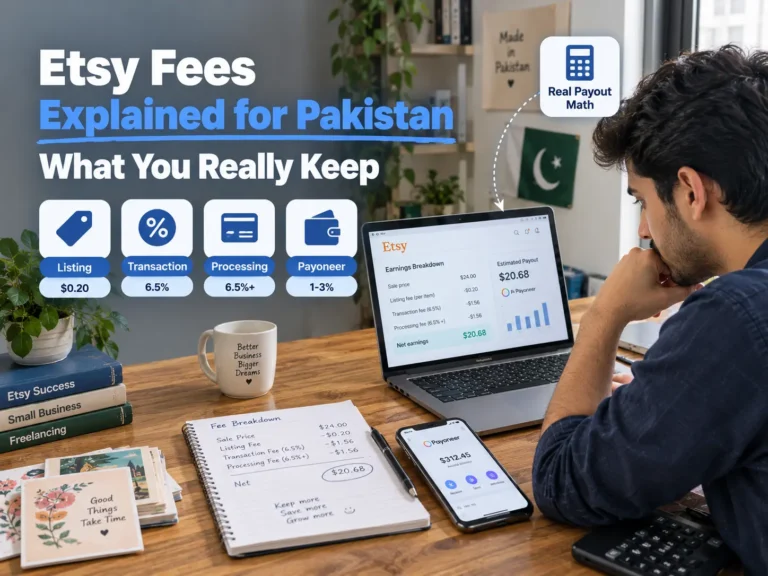
AI products tend to sit at low prices, and low prices are where Etsy’s fixed charges bite hardest. For Pakistani sellers the payment processing rate is also higher than the figure usually quoted online, which makes it worse. Using Etsy’s published rates for Pakistan (a 6.5% transaction fee, a 6.5% plus $0.30 payment processing fee, and the $0.20 listing fee), one sale works out like this:
| Sale price | Etsy fees | You keep before Payoneer |
| $6 | $1.28 | $4.72 |
| $12 | $2.06 | $9.94 |
| $20 | $3.10 | $16.90 |
Payoneer’s conversion cut comes after that. At $6, about a fifth of the sale is gone before it reaches you. The fee math post walks through the whole stack, and it’s worth reading before you decide a $3 clipart pack is a good idea.
Three Scenarios Worth Picturing
These are illustrative situations, not case studies of real shops. They show how the pieces above fit together.
A student in Lahore has a free evening each week and no budget. She uses a free image tool, builds a themed set of classroom clipart in Canva, writes the disclosure sentence, and lists eight related sets. Her costs are tiny, and her real bottleneck is quality control. She should expect weeks, not days, before the first order.
A freelance designer in Karachi already makes planners. He adds AI-made illustrations to his own layouts and labels the listings “designed by” with a short note on what he edited. The AI saves him an hour per product, but the structure is still his, which is what separates his listings from pure image dumps.
A seller in Islamabad decides to sell Islamic wall art because it looks easy. The tool keeps giving her almost-right Arabic, and on a closer check she finds three mistakes in one design. Now she has to choose between typing every verse by hand or dropping the niche. The idea isn’t doomed. Treating it as a copy-and-paste job was the mistake.
Which One to Start With
Run through these before you pick a product:
- Do you have a tool whose terms clearly allow selling what it makes?
- Can you spare a few hours a week for several weeks, not a single weekend?
- Do you enjoy talking to buyers? If not, skip custom portraits.
- Can you add a skill on top, like layout, editing, or a niche you know well?
- Will you check any Arabic or Urdu text with someone who reads it properly?
- Do you need money this month? If yes, none of this is fast enough.
If most answers are yes, start in the green section with a small group of related listings. If you have an existing design skill, a yellow item becomes realistic. If the first question is a no, fix that before anything else.
When AI Products Work, and When They Don’t
They work when there’s a defined buyer, when the product needs real structure that you build yourself, and when you’re willing to list a connected group of items instead of a one-off. They also work for people who treat the AI output as raw material and spend their time on editing and curation.
They don’t work well when the plan is to upload raw outputs and hope. They struggle in categories already flooded with near-identical listings, and they’re a bad idea if you can’t confirm commercial rights for the tool you’re using. They also won’t pay your bills quickly. Etsy needs time and a bit of sales history before it shows a new shop to many people, so plan for weeks before the first order.
How to Tell What’s Wrong
Views but no sales usually point at the listing itself: the price, the preview images, or a description that doesn’t answer the buyer’s obvious questions. Very few view points at titles and tags that don’t match how buyers type, or a niche that’s too crowded. The first sale guide goes through those checks in more depth.
Messages asking whether something is AI usually mean your disclosure isn’t clear enough, or that the buyer cares. Some buyers avoid AI-made art on purpose, and that’s simply part of the market you’re selling into.
If Etsy removes a listing, read the reason in their message and compare it with Etsy’s own list of removal reasons on its help site. Fix what they name, save the evidence of your process, and don’t relist the same file unchanged.
Mistakes That Cost Pakistani Sellers the Most
Uploading raw outputs. Buyers notice extra fingers, smudged edges, and text that almost spells a word. Edit before you sell.
Skipping disclosure or choosing the wrong label. It’s an easy mistake and an expensive one.
Picking the most crowded category. Generic wall art is where the most people end up, which is exactly why it’s hard to stand out.
Pricing without the fee math. A low price looks harmless until you see what’s left after Etsy and Payoneer.
Ignoring the tool’s licence. A free plan that doesn’t allow commercial use turns your whole shop into a risk.
Trusting AI with Arabic or Urdu text. A wrong letter on a religious design is a serious error, and customers will notice.
Listing a hundred items in one week. You pay the listing fees up front, and a flood of similar files looks exactly like what Etsy is trying to filter out.
Common Questions
Do I have to tell buyers it’s AI?
Yes. Etsy expects a disclosure in the description of any item created with AI, and the label should be “designed by.”
Can I include the prompts with my artwork?
Yes, as an extra alongside the finished art. A listing that sells only prompts isn’t allowed, and it appears on Etsy’s removal reasons list.
Can I sell AI art as handmade?
No. Calling AI-made work “made by” or “handmade” is misleading and can get a listing removed.
Is a free tool enough to start?
For learning, yes. For selling, check the commercial terms first, because free plans often have different rules from paid ones.
Do I need anything special for payments?
No more than any other Pakistani seller. Etsy pays into Payoneer, and Payoneer sends it on to your bank. AI products just make the fee math more important because prices tend to be low.
Etsy’s rules and the tool plans described here were checked against their published pages in October 2026. If a tool’s pricing or terms look different when you sign up, trust the live page over any guide, and let the Etsy rules guide what you make: disclosed, labelled correctly, and finished by a human.