ChatGPT Prompts for YouTube Video Descriptions: Zone Guide
Most YouTube descriptions fall into two groups. Some are empty. The rest are a wall of links with a line of hashtags on top. Both waste a free space where a viewer is already interested enough to look.
A good description does three small jobs. It helps a viewer decide whether to keep watching. It helps them jump to the part they need. And it gives them somewhere useful to go next. None of this is hard, but it is easy to skip when you are tired after editing.
ChatGPT is a good helper here, because descriptions are structured and repetitive. The catch is that it cannot watch your video. This guide shows how to give it the facts, then walks through the description from top to bottom with a prompt for each part, a master prompt and a few quality checks.
In short: write the first two lines for the viewer, add real chapters, label every link, keep a short reusable footer, and always feed ChatGPT the transcript so it never has to guess.
A description works together with the title, not alone. If your title still needs work, our title prompts are a good place to start.
The description box, from top to bottom
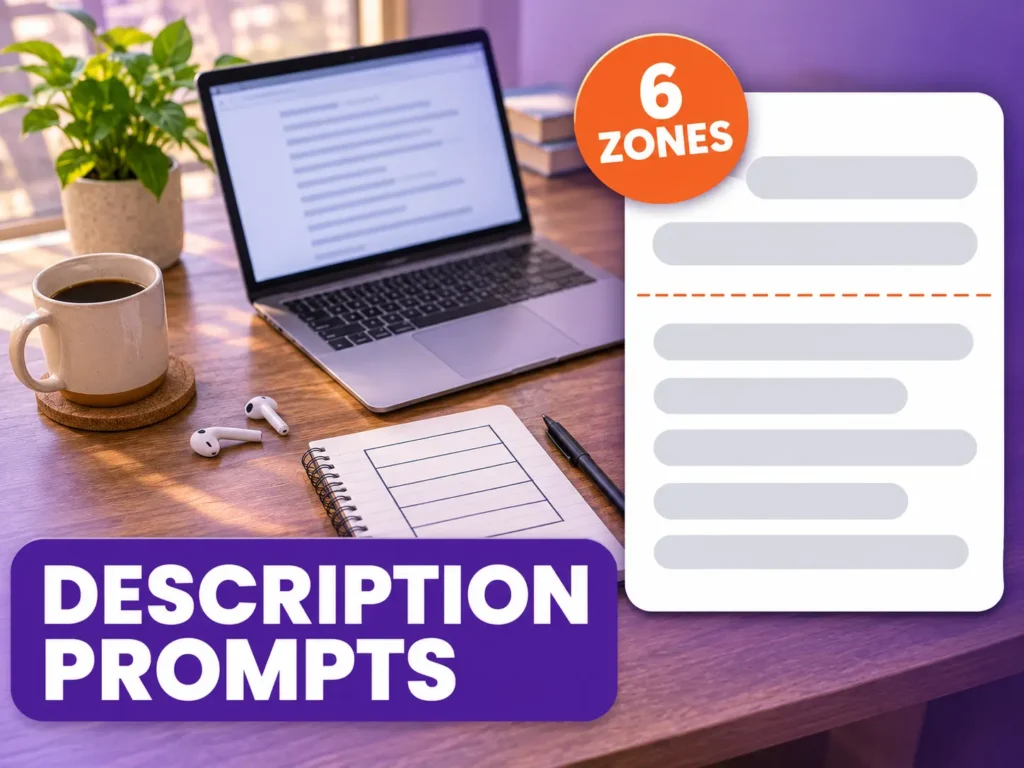
Think of the description as six zones stacked in a box. Only the first one shows before the viewer taps to see more, so it carries the most weight.
Descriptions can run up to 5,000 characters, but length is not the goal. Clear, useful and honest is. Most good descriptions are far shorter than the limit.
Start with the facts, not the writing
ChatGPT cannot see your video. If you simply say “write a description for my video about budgeting”, it invents the details. The result sounds smooth and says nothing true about your video, and viewers notice when a description does not match what they watched.
The fix is to give it the transcript, and to turn that transcript into a facts card once. Every prompt after that uses the same card.
You can copy a transcript from the captions that YouTube Studio generates for your video, or from your own script. Keep the timestamps in. They are what makes the chapter step possible.
I will paste the transcript of a YouTube video. Do not write a description yet. First, build a facts card that I can reuse for every description task. Extract and list: 1) TOPIC: one sentence. 2) VIEWER: who this video helps. 3) PROMISE: what the viewer gets by the end. 4) KEY POINTS: the 5 to 8 main points, in plain words. 5) SECTIONS: the main sections with the timestamps that appear in the transcript. Copy the times exactly. Do not guess. 6) THINGS MENTIONED: tools, books, websites or people named in the video. 7) CLAIMS TO CHECK: any number, date or fact that I should verify. 8) SPONSOR OR AFFILIATE: anything that sounds paid or linked. If something is missing, write “not in transcript” instead of guessing. TRANSCRIPT (with timestamps): [paste transcript]The last line of that prompt matters most. “Not in transcript” gives ChatGPT permission to leave a gap instead of filling it with an invention.
If you already have a polished script from our script prompts, you can use that in place of a transcript, as long as it matches what you actually said in the final video.
Zone 1: the first two lines
This is the only part many viewers will read. It should say what they get and why it is worth their time, in plain words, without a link and without “subscribe”.
Using the facts card above, write 8 options for the opening two lines of a YouTube description. RULES: each option is 1 or 2 sentences and under 150 characters in total, because only the first lines show before a viewer taps to see more. Say what the viewer will learn or get, and why it is worth watching. Use the topic phrase naturally once at most, in everyday wording. No links, no “subscribe”, no “in this video”, no hashtags, no ALL CAPS, and no promise that the video does not deliver. The viewer is: [viewer]. After each option, show the character count in brackets.Read your favorite option next to the title. They should not repeat each other. The title makes the promise, and the opening lines add the proof or the detail.
Zone 2: the summary
The summary is for the viewer who tapped to see more. Keep it short and honest. A few clear paragraphs beat a list of vague phrases repeated many times.
Write the summary section of the description, 90 to 140 words, in 2 or 3 short paragraphs. Paragraph 1: the problem the viewer has and what the video shows. Paragraph 2: the 3 or 4 most useful points, in plain words, as flowing sentences rather than a bullet list. Paragraph 3 (optional): who the video is for and who it is not for. Use natural variations of the topic instead of repeating the same phrase. Do not add anything that is not in the facts card. No hype words such as ultimate, secret or game-changing.The “who it is not for” line is a small trust builder. A viewer who sees that you were honest about the limits is more likely to believe the rest.
Zone 3: chapters
Chapters turn a long video into something people can navigate, and they often show up as labeled sections along the video. YouTube has rules for them: the list must start at 0:00, have at least three timestamps, and each chapter must be at least ten seconds long. The details can change, so check the current rules on YouTube Help.
This is the zone where ChatGPT is most likely to go wrong, because it will happily invent times. The prompt below stops that.
Turn the timestamps in the facts card into a chapter list for the description. RULES: the first chapter must start at 0:00. Use at least 3 chapters, and every chapter must be at least 10 seconds long. Keep each chapter name to 2 to 6 words, in plain language that tells the viewer what they will get. Put the most useful word first. Use the exact times from the transcript. Never invent, round or estimate a timestamp. If a time is missing, write [TIME MISSING] and stop so I can fill it in. FORMAT: one chapter per line, like this: 0:00 Chapter nameAfter ChatGPT answers, open the video and click three of the timestamps. If any lands in the wrong place, fix the list before you publish.
Zone 4: links and resources
A pile of unlabeled links is hard to use. Group them, say what each one is, and put the most useful one first. Paid links need extra care, because honesty here is both a rule and a matter of trust.
Organize the links and mentions below into a resources section for a YouTube description. Group them under short labels such as “Tools mentioned”, “Related videos” and “Further reading”. Put the single most useful link first. Add one plain line before each link that says what it is, never “click here”. If any item is paid, sponsored or an affiliate link, put a clear disclosure line above the whole group in simple words, for example: “Some links below are affiliate links. I may earn a small commission at no extra cost to you.” Do not invent links. Use [LINK] wherever I have not given one. ITEMS: [paste links and notes]If you earn from a link or receive a free product, tell viewers plainly. Rules differ by country, and YouTube also offers a setting to mark paid promotion inside Studio.
Keep links relevant too. Links to things the video never mentions feel like spam, and viewers learn quickly to skip them.
Zone 5: the channel footer
The footer is the one part you write once and reuse. It tells new viewers what the channel is about and where to find more, in a few lines.
Write a reusable channel footer for the bottom of every description. It must be under 80 words. Include: one sentence about what the channel makes and for whom ([channel topic and viewer]), the upload rhythm if I give one ([schedule]), and where to find the channel’s other links ([links]). Keep it warm and plain. No promises about income, results or fast growth. Give me 3 versions: calm, friendly and direct.Save the version you like in a note and paste it at the bottom of every upload. Update it when your links or schedule change, and check older videos now and then so they do not point to dead pages.
Zone 6: hashtags
Hashtags are small, but they are easy to misuse. A few honest ones help. A pile of unrelated trending tags looks like spam and can get a video flagged as misleading. Three is a comfortable number.
Suggest 3 hashtags for this video, based on the facts card. Each must describe the real topic, be easy to read in camel case (for example #StudyTips), and be something a viewer might really click. No unrelated trending tags and no tags about things the video does not cover. Then give me 2 spare options in case a tag is too crowded or too broad.Hashtags are also part of what viewers see near the title, so choose words you would be happy for a stranger to read first.
The master prompt
Once you trust each zone, you can ask for the whole description in one go. This prompt combines them, and it works best in the same chat as the facts card.
Using the facts card above, write a complete YouTube description in this order: 1) OPENING: 1 or 2 sentences under 150 characters that say what the viewer gets and why it is worth watching. No link, no “subscribe”, no “in this video”. 2) SUMMARY: 90 to 140 words in 2 or 3 short paragraphs, in plain words. 3) CHAPTERS: from the timestamps in the facts card. Start at 0:00, use at least 3 chapters of at least 10 seconds each, and never invent a time. If a time is missing, write [TIME MISSING]. 4) RESOURCES: group the links I give you under labels, one plain line before each link, with a disclosure line first if anything is paid or affiliated. Use [LINK] where I did not give one. 5) FOOTER: use the footer below exactly as written. 6) HASHTAGS: 3 honest hashtags in camel case. STYLE: simple spoken English, natural variations of the topic, no repeated phrases, no hype words, nothing that the video does not contain. Keep the full description under 2,000 characters. LINKS: [paste] FOOTER: [paste] After the description, list every item that needs my attention, such as [TIME MISSING], [LINK] and anything you were unsure about.Read the result like a viewer. Does the opening make you want to watch? Do the chapters match the video? Would you trust the links? Rewrite anything that feels off.
Faceless channels can lean on descriptions even more, because there is no face to build familiarity. If you run one, our guide to faceless channels shows what works.
Four add-ons for different videos
Not every video needs the same description. Add one of these lines to the master prompt to change its shape.
Tutorials
Viewers follow along with tutorials, so they want a list of what they need.
Add a short “What you need” list before the chapters, with each item on its own line, and a one-sentence note about the skill level required. Do not list anything that is not used in the video.Reviews
Reviews depend on trust, so honesty about how the product was obtained matters.
Add a one-sentence verdict after the summary that includes one real weakness. Add a disclosure line stating whether the product was bought, gifted or sent for review: [how I got the product]. Do not use words like perfect, best ever or must-buy.Stories and case studies
Narrative videos benefit from a note on where the facts came from.
Add a short “Sources and notes” section at the end. List only the sources I give you below, and mark any claim in the transcript that has no source with [SOURCE NEEDED]. Sources: [paste].Long educational videos
Long videos need strong chapters and a clear path through them.
Write chapters with extra care for a long video: use between 8 and 15 chapters, group related ideas together, and add a one-line “Start here if you are new” suggestion that points to the best chapter for beginners, using an exact timestamp from the transcript.Refreshing old descriptions
Your older videos still have descriptions, and many of them are thin, outdated or full of dead links. Updating a few each week is one of the cheapest improvements you can make, and it helps viewers who arrive from older content.
Review the old description below against the facts card. List what is weak: unclear opening, missing chapters, repeated phrases, unlabeled links, outdated information, or hashtags that do not match the video. Then rewrite it. Keep any link that is still valid and mark any link I need to check with [CHECK LINK]. Flag any claim that may be outdated, such as prices, dates or software versions, with [CHECK]. OLD DESCRIPTION: [paste]Start with the videos that still get steady views. A better description helps most where viewers are already arriving.
A strict editor for your own work
Before you publish, run one more pass. This prompt acts like an editor who does not know you and is not trying to be nice.
Audit the description below like a strict editor. Check: 1) Do the first 150 characters make a clear, honest promise? 2) Is the topic phrase used naturally and not repeated too often? 3) Are the chapters valid: they start at 0:00, there are at least three, and each is at least 10 seconds long? 4) Are the links labeled, and is every paid or affiliate link disclosed? 5) Is there any claim the video does not support? 6) Are the hashtags honest and relevant? Score each point from 1 to 5. Show the lowest score first with a specific fix, and rewrite only the parts that need it. DESCRIPTION: [paste] FACTS CARD: [paste]Fixing the lowest score first is the quickest way to improve a description, and it stops you from polishing parts that were already fine.
Staying honest
A description is a promise too. A few habits keep it that way.
Match the video. Do not add topics the video does not cover just to reach more people. Viewers leave quickly when the description and the video disagree.
Keep tags honest. Unrelated hashtags and crowded descriptions can be treated as misleading, and platform rules on this change over time.
Disclose what is paid. Sponsorships, affiliate links and free products should be easy to spot. In the United States, the FTC guidance explains how clear a disclosure should be, and other countries have similar rules.
Check what ChatGPT writes. It can state invented numbers and fake links with great confidence. Any link, price or fact that you did not provide should be verified by hand.
The writing itself should still sound like a person, so read every draft aloud once before you publish it.
Frequently Asked Questions
How long should a YouTube description be?
There is no ideal length. Descriptions can run up to 5,000 characters, but most good ones are short and clear. Cover the opening, a short summary, chapters, useful links and a footer, and stop there.
Can ChatGPT write my chapters and timestamps?
It can format them, but it cannot know the times unless you paste a timestamped transcript. Tell it never to invent a time, and click each chapter to check it before you publish.
What should go in the first two lines?
What the viewer will learn or get, and why it is worth watching. Keep it under about 150 characters, leave out links and “subscribe”, and do not repeat the title word for word.
How many hashtags should I use?
Three honest ones are plenty. Choose tags that describe the real topic, and avoid unrelated trending tags that could make a video look misleading.
Should I use the same description for every video?
Only the footer should repeat. The opening, summary, chapters and links should be written for each video, because viewers can tell when a description was copied.
Do I need to disclose affiliate links?
Yes. Say plainly that a link is an affiliate or paid link, near the top of the links section. Check the rules for your country and for the platform you use.
Should I paste my whole transcript into the description?
Usually not. A long block of text makes the description hard to read. Use a short summary and chapters instead.
How often should I update old descriptions?
Review them when a link breaks, when information changes, or when a video keeps getting steady views. A few updates each week are enough to make a real difference over time.
Try it on one video
Pick a video you published recently. Paste its transcript into the facts card prompt, then work through the zones one at a time. It should take about twenty minutes the first time and far less after that.
Keep your best prompts and your footer in a single note, and adjust the wording whenever a result feels off. If a draft still sounds stiff, our editing guide shows how to catch the usual AI habits and fix them quickly.